A small, GUI-free companion to Trndi — one-shot readings for scripts, or a full text-mode graph.
$ trndi-cli 12.9 mmol/L → (±0.0) 21:55 $ trndi-cli --spark ▃▃▄▅▅▅▅▄▄▃▃▂▂▂▁▁▁▂▃▃▃▄▅▇██████▇▇▆▆▅ 7.1 mmol/L ↘ (-0.4) 20:15
Linux • Raspberry Pi • Windows • FreeBSD • Haiku
macOS builds from source
Screenshots
Features
Run it bare and get the current value, trend arrow, delta and time on one line. Perfect for a prompt, MOTD or status bar.
--check reports the range in the exit code — high, low, stale or unreachable — so a cron job can alarm without parsing output.
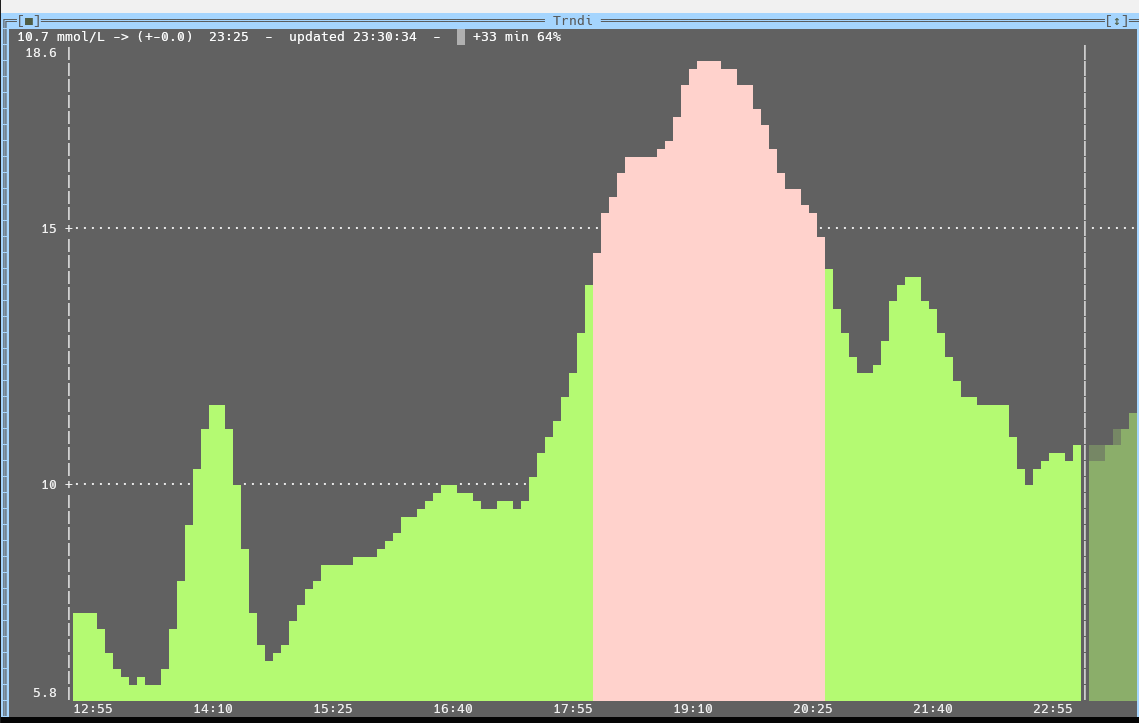
--graph draws the last hours as a colour-coded bar graph in a Free Vision text UI. Arrow keys inspect readings, F5 refreshes.
Trndi's own prediction model adds a shaded half-hour forecast, shown only when the fit is trustworthy and labelled with its confidence.
--spark compresses the last hours into a single coloured line of block glyphs. Piped output comes out plain for status-bar modules.
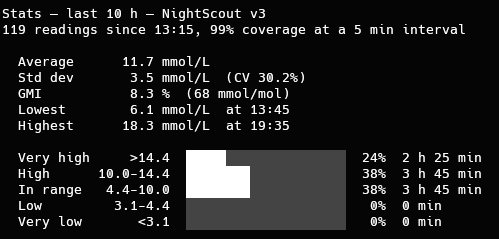
--stats summarises any window up to a week: average, spread, GMI, extremes and a five-band time-in-range breakdown.
--agp folds two weeks onto a 24-hour axis with median and percentile bands — the view diabetes clinics work from.
--csv writes readings with time, value, delta, trend and range band, ready for a spreadsheet or your own analysis.
--device lists sensor life, reservoir, pump and transmitter batteries and the basal rate, where the backend reports them.
Trndi's accounts carry over: --profile picks which person a run follows, so two terminals can watch two people.
Built on the same API and platform layer as the desktop app. If Trndi is set up, trndi-cli needs no configuration at all.
GPLv3, like Trndi. No subscription, no ads, no data collection. Tab completion for bash, zsh and fish included.
Get started
A single binary per platform — no installer needed.
More platforms:
The Windows builds load libcurl.dll at start. Download the matching package from
curl.se/windows, rename its libcurl-x64.dll
(or libcurl-arm64.dll from the win64a-mingw package for ARM64) to
libcurl.dll, and place it next to the exe or in PATH.
Mark the file executable (chmod +x trndi-cli-linux-amd64) and run it. Building from
source with make and sudo make install also installs tab completion for
bash, zsh and fish. macOS has no prebuilt binary yet but builds the same way.
Build instructions →
All versions: View all releases on GitHub
Setup
Then you are done. trndi-cli reads the same settings file the desktop app saves — backend, credentials, unit and thresholds — including every account in multi-user mode.
Run trndi-cli --setup. A text-mode settings window asks for the backend, address and secret, with a Test button that connects before saving. See the manual for every key.
trndi-cli print the current reading and exit trndi-cli --check ... with the range in the exit code, for scripts trndi-cli --graph interactive TUI graph (F5 refresh, F6 forecast, F7 AGP, F9 settings, Q exits) trndi-cli --predict ... with the forecast drawn from the start trndi-cli --stats 6 summarise the last 6 hours (1 to 168) trndi-cli --spark 8 the last 8 hours as a one-line sparkline (1 to 24) trndi-cli --agp 7 time-of-day percentile profile of the last 7 days (3 to 28) trndi-cli --csv 72 the last 72 hours of readings as CSV, oldest first trndi-cli --device sensor life, reservoir, batteries and basal, where reported trndi-cli --unit mgdl any mode above in mg/dL (or mmol) for this run only trndi-cli -p Anna ... any mode above against that account's settings trndi-cli --setup settings window: backend, address, secret, unit, limits
💡 Exit codes: 0 OK • 1 not configured • 2 unknown backend • 3 connection failed • 4 no recent reading • with --check: 5 above high, 6 below low.
trndi-cli --check >/dev/null; [ $? -eq 6 ] && notify-send -u critical "Low glucose"
Ask questions, share your setup, report bugs, or just hang out with other Trndi users and contributors.